
Over the next several sections, the lab will walk you through using different tools and libraries to work with YANG. These tools and libraries include Ansible, Python ncclient, and Python requests. For these sections, you will be using your existing fabric to onboard a new L2 VNI in your existing Tenant-1 overlay.
In this module, you are going to use Ansible to perform NETCONF YANG interactions with your leaf switches to configure
VLAN to VNI mappings. Ansible has a few NETCONF-based modules, netconf_config, netconf_get,
and netconf_rpc, along with a netconf plugin to interact with NETCONF-enabled devices. For this module, you
will leverage the netconf_config module to make configuration changes and the netconf_get module
to verify the configuration changes. Instead of hardcoding VLAN/VNI values, you will create a reusable Jinja2 XML template
that dynamically renders NETCONF RPCs from the networks and vrfs variables already defined in
your group_vars/leafs.yml file.
Return to your NX-API Sandbox on your Leaf1 using the IP address below, or if you still have the session open from earlier in the lab:
Log in using your username and password:
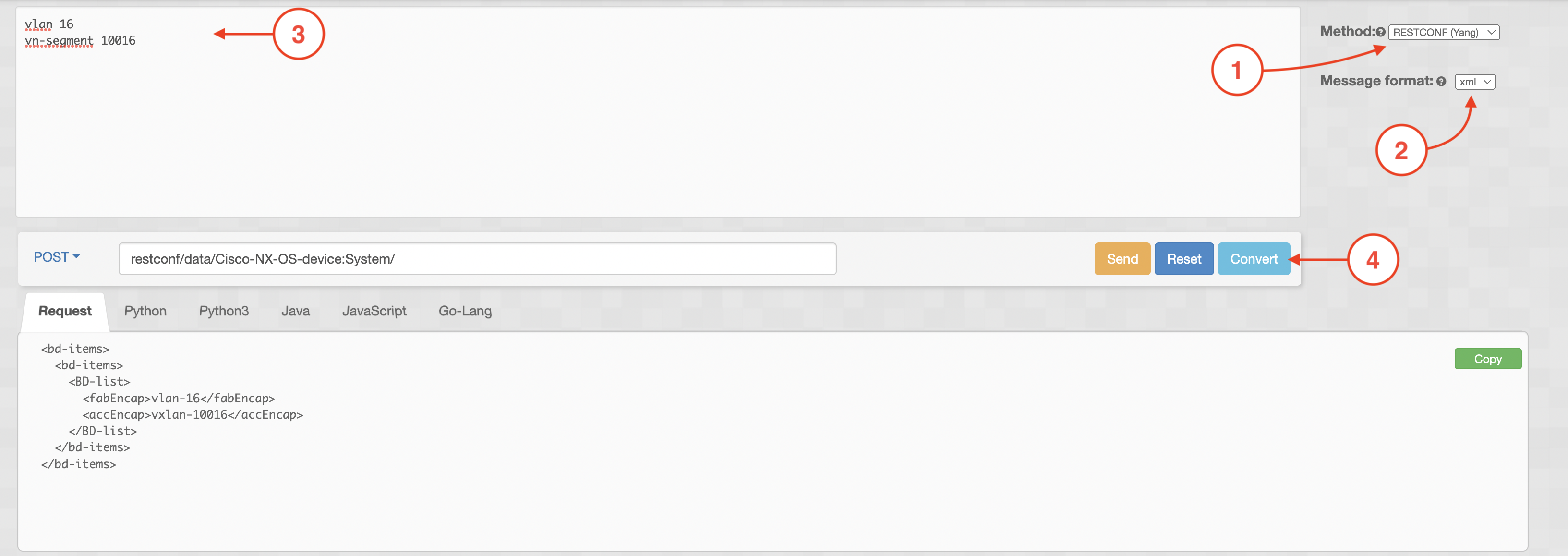
In the Sandbox, set the Method to RESTCONF (Yang) and the Message format to xml. Copy and paste a VLAN and VNI mapping
below into the text field. Then, click Convert. This example uses VLAN 101 / VNI 10101 from your networks
variable in group_vars/leafs.yml (AnsibleNet1).
vlan 16
 vn-segment 10016
It is important to notice that the Sandbox is a great way to learn how to convert the CLI you know today into YANG XML configuration templates. As you will see in the subsequent steps below, you will be taking the converted output and using it within an Ansible Jinja2 template that dynamically renders the XML for all VLANs defined in your group_vars.
Return to your Terminal window and issue pip freeze | grep ncclient:
cd /home/pod03/workspace/nxapilab
pip freeze | grep ncclient
pip freeze | grep ncclient output:
ncclient==0.7.1
ncclient is a Python library that can be leveraged for client-side scripting and application development for the NETCONF protocol. The ncclient package was automatically installed when pyats was installed earlier in the lab.
Within your existing ansible-nxos directory, create a new role for the NETCONF tasks. First, change to the 'roles' subdirectory and then create a new role.
cd /home/pod03/workspace/nxapilab/ansible-nxos/roles
ansible-galaxy init nc_vlan_vni
Using the output from the Sandbox, create a Jinja2 XML configuration template file. You may notice the outer <config> elements
and the <System> element. The <config> element is required by NETCONF for a configuration to be made. The <System>
element includes the YANG model being used and was derived from the Sandbox as well, from the POST field.
Instead of hardcoding a single VLAN/VNI, this template uses a for loop to iterate over the networks
and vrfs variables from your group_vars/leafs.yml and dynamically generates a <BD-list>
entry for each mapping. Copy the Jinja2 template below into a .j2 file.
touch /home/pod03/workspace/nxapilab/ansible-nxos/roles/nc_vlan_vni/templates/vlan_vni.xml.j2
cat <<EOF > /home/pod03/workspace/nxapilab/ansible-nxos/roles/nc_vlan_vni/templates/vlan_vni.xml.j2
<config>
<System xmlns="http://cisco.com/ns/yang/cisco-nx-os-device">
    <bd-items>
    <bd-items>
{% for net in networks %}
        <BD-list>
        <fabEncap>vlan-{{ net.vlan_id }}</fabEncap>
        <accEncap>vxlan-{{ net.vni_id }}</accEncap>
        </BD-list>
{% endfor %}
{% for vrf in vrfs if vrf.vlan_id is defined %}
        <BD-list>
        <fabEncap>vlan-{{ vrf.vlan_id }}</fabEncap>
        <accEncap>vxlan-{{ vrf.vni_id }}</accEncap>
        </BD-list>
{% endfor %}
    </bd-items>
    </bd-items>
</System>
</config>
EOF
Ansible's netconf_config module also performs a get-config operation as part of a configuration comparison to
make the module idempotent. This filter template also uses a for loop to match all VLANs being configured.
Note: The <config> element is absent from the filter, as this is not used for a config operation.
touch /home/pod03/workspace/nxapilab/ansible-nxos/roles/nc_vlan_vni/templates/vlan_vni_filter.xml.j2
cat <<EOF > /home/pod03/workspace/nxapilab/ansible-nxos/roles/nc_vlan_vni/templates/vlan_vni_filter.xml.j2
<System xmlns="http://cisco.com/ns/yang/cisco-nx-os-device">
    <bd-items>
        <bd-items>
{% for net in networks %}
        <BD-list>
            <fabEncap>vlan-{{ net.vlan_id }}</fabEncap>
            <accEncap>vxlan-{{ net.vni_id }}</accEncap>
        </BD-list>
{% endfor %}
{% for vrf in vrfs if vrf.vlan_id is defined %}
        <BD-list>
            <fabEncap>vlan-{{ vrf.vlan_id }}</fabEncap>
            <accEncap>vxlan-{{ vrf.vni_id }}</accEncap>
        </BD-list>
{% endfor %}
        </bd-items>
    </bd-items>
</System>
EOF
Next, create a Jinja2 XML template for configuring the NVE1 (VXLAN Tunnel Endpoint) interface. This template maps each
network's VNI to its multicast group, and each VRF's VNI with the associateVrfFlag set to true. The
epId, adminSt, hostReach, and sourceInterface values are static
for the NVE interface configuration.
touch /home/pod03/workspace/nxapilab/ansible-nxos/roles/nc_vlan_vni/templates/nve.xml.j2
cat <<EOF > /home/pod03/workspace/nxapilab/ansible-nxos/roles/nc_vlan_vni/templates/nve.xml.j2
<config>
<System xmlns="http://cisco.com/ns/yang/cisco-nx-os-device">
  <eps-items>
    <epId-items>
      <Ep-list>
        <epId>1</epId>
        <adminSt>enabled</adminSt>
        <hostReach>bgp</hostReach>
        <sourceInterface>lo1</sourceInterface>
        <nws-items>
          <vni-items>
{% for net in networks %}
            <Nw-list>
              <vni>{{ net.vni_id }}</vni>
              <mcastGroup>{{ net.mcast_grp }}</mcastGroup>
            </Nw-list>
{% endfor %}
{% for vrf in vrfs if vrf.vni_id is defined %}
            <Nw-list>
              <vni>{{ vrf.vni_id }}</vni>
              <associateVrfFlag>true</associateVrfFlag>
            </Nw-list>
{% endfor %}
          </vni-items>
        </nws-items>
      </Ep-list>
    </epId-items>
  </eps-items>
</System>
</config>
EOF
Similar to the VLAN/VNI filter, create a filter template for the NVE interface. This allows the netconf_config
module to compare the desired NVE state against what is already on the device, ensuring idempotency. The filter is the
same structure as the config template but without the outer <config> wrapper.
touch /home/pod03/workspace/nxapilab/ansible-nxos/roles/nc_vlan_vni/templates/nve_filter.xml.j2
cat <<EOF > /home/pod03/workspace/nxapilab/ansible-nxos/roles/nc_vlan_vni/templates/nve_filter.xml.j2
<System xmlns="http://cisco.com/ns/yang/cisco-nx-os-device">
  <eps-items>
    <epId-items>
      <Ep-list>
        <epId>1</epId>
        <nws-items>
          <vni-items>
{% for net in networks %}
            <Nw-list>
              <vni>{{ net.vni_id }}</vni>
              <mcastGroup>{{ net.mcast_grp }}</mcastGroup>
            </Nw-list>
{% endfor %}
{% for vrf in vrfs if vrf.vni_id is defined %}
            <Nw-list>
              <vni>{{ vrf.vni_id }}</vni>
              <associateVrfFlag>true</associateVrfFlag>
            </Nw-list>
{% endfor %}
          </vni-items>
        </nws-items>
      </Ep-list>
    </epId-items>
  </eps-items>
</System>
EOF
Create a Jinja2 XML template for configuring the EVPN control plane. Each network VNI requires a <BDEvi-list>
entry with its encapsulation, route-distinguisher, and route-target import/export settings. The rd and rtt
values are set to unknown:0:0 which instructs NX-OS to auto-derive them. The adminSt for EVPN
is hardcoded as enabled.
touch /home/pod03/workspace/nxapilab/ansible-nxos/roles/nc_vlan_vni/templates/evpn.xml.j2
cat <<EOF > /home/pod03/workspace/nxapilab/ansible-nxos/roles/nc_vlan_vni/templates/evpn.xml.j2
<config>
<System xmlns="http://cisco.com/ns/yang/cisco-nx-os-device">
  <evpn-items>
    <adminSt>enabled</adminSt>
    <bdevi-items>
{% for net in networks %}
      <BDEvi-list>
        <encap>vxlan-{{ net.vni_id }}</encap>
        <rd>rd:unknown:0:0</rd>
        <rttp-items>
          <RttP-list>
            <type>export</type>
            <ent-items>
              <RttEntry-list>
                <rtt>route-target:unknown:0:0</rtt>
              </RttEntry-list>
            </ent-items>
          </RttP-list>
          <RttP-list>
            <type>import</type>
            <ent-items>
              <RttEntry-list>
                <rtt>route-target:unknown:0:0</rtt>
              </RttEntry-list>
            </ent-items>
          </RttP-list>
        </rttp-items>
      </BDEvi-list>
{% endfor %}
    </bdevi-items>
  </evpn-items>
</System>
</config>
EOF
Create the corresponding filter template for the EVPN configuration to enable idempotency.
touch /home/pod03/workspace/nxapilab/ansible-nxos/roles/nc_vlan_vni/templates/evpn_filter.xml.j2
cat <<EOF > /home/pod03/workspace/nxapilab/ansible-nxos/roles/nc_vlan_vni/templates/evpn_filter.xml.j2
<System xmlns="http://cisco.com/ns/yang/cisco-nx-os-device">
  <evpn-items>
    <bdevi-items>
{% for net in networks %}
      <BDEvi-list>
        <encap>vxlan-{{ net.vni_id }}</encap>
        <rd>rd:unknown:0:0</rd>
        <rttp-items>
          <RttP-list>
            <type>export</type>
            <ent-items>
              <RttEntry-list>
                <rtt>route-target:unknown:0:0</rtt>
              </RttEntry-list>
            </ent-items>
          </RttP-list>
          <RttP-list>
            <type>import</type>
            <ent-items>
              <RttEntry-list>
                <rtt>route-target:unknown:0:0</rtt>
              </RttEntry-list>
            </ent-items>
          </RttP-list>
        </rttp-items>
      </BDEvi-list>
{% endfor %}
    </bdevi-items>
  </evpn-items>
</System>
EOF
Create the Ansible tasks using the netconf_config module. The netconf_config
module will be used to send the RPC from the Jinja2 XML template created in the step above and apply it to the running config.
Notice the use of lookup('template', ...) instead of lookup('file', ...). The template
lookup renders the Jinja2 template with all in-scope variables (including networks and vrfs from
group_vars) before passing the resulting XML to the NETCONF module.
Copy the playbook YAML file.
cat <<EOF > /home/pod03/workspace/nxapilab/ansible-nxos/roles/nc_vlan_vni/tasks/main.yml

---
- name: CONFIGURE NX VLAN VNI MAPPING USING NETCONF
  ansible.netcommon.netconf_config:
    datastore: running
    content: "{{ lookup('template', '../templates/vlan_vni.xml.j2') }}"
    get_filter: "{{ lookup('template', '../templates/vlan_vni_filter.xml.j2') }}"

- name: CONFIGURE NVE1 INTERFACE USING NETCONF
  ansible.netcommon.netconf_config:
    datastore: running
    content: "{{ lookup('template', '../templates/nve.xml.j2') }}"
    get_filter: "{{ lookup('template', '../templates/nve_filter.xml.j2') }}"

- name: CONFIGURE EVPN USING NETCONF
  ansible.netcommon.netconf_config:
    datastore: running
    content: "{{ lookup('template', '../templates/evpn.xml.j2') }}"
    get_filter: "{{ lookup('template', '../templates/evpn_filter.xml.j2') }}"

- name: SAVE CONFIGURATION
  ansible.netcommon.netconf_rpc:
    rpc: copy_running_config_src
    xmlns: "http://cisco.com/ns/yang/cisco-nx-os-device"
    content: |
     <startup-config/>

EOF
Now that your Jinja2 templates dynamically render VLAN/VNI mappings from your networks variable, you can
easily add a new L2 VNI by simply appending an entry to your group_vars/leafs.yml file. The NETCONF templates
will automatically pick up the new entry and include it in the RPC.
Add a new network entry with VLAN 16 and VNI 10016:
cat <<EOF >> /home/pod03/workspace/nxapilab/ansible-nxos/group_vars/leafs.yml
  - name: NetconfNet1
    vrf: *refvrf_ansiblevrf
    vlan_id: 16
    vni_id: 10016
    ip_address: 192.168.16.1
    mask: 24
    mcast_grp: 239.1.1.16
EOF
With this entry appended, your vlan_vni.xml.j2 template will now render an additional
<BD-list> block for VLAN 16 / VNI 10016 alongside the existing networks when the playbook executes.
Create a new YAML inventory file with a parent group called nc containing a leafs child group.
By using the leafs group name, the variables in group_vars/leafs.yml (including
networks and vrfs) will automatically be available to your NETCONF templates.
Copy the nc_hosts.yml file.
cat <<EOF > /home/pod03/workspace/nxapilab/ansible-nxos/nc_hosts.yml
# hosts file for NETCONF Ansible playbook
---
nc:
  children:
    leafs:
      hosts:
        staging-leaf1:
            ansible_host: 10.15.3.21
        staging-leaf2:
            ansible_host: 10.15.3.22
        staging-leaf3:
            ansible_host: 10.15.3.23

EOF
Create a NETCONF connection override file for the leafs group. Since the existing group_vars/leafs.yml
already contains your networks and vrfs data, you only need to override the connection
settings to switch from httpapi to NETCONF. Create a group_vars/leafs/ directory structure to layer
this alongside the existing vars.
Copy the NETCONF connection YAML file.
mkdir -p /home/pod03/workspace/nxapilab/ansible-nxos/group_vars/nc
cat <<EOF > /home/pod03/workspace/nxapilab/ansible-nxos/group_vars/nc/netconf.yml
---
ansible_connection: ansible.netcommon.netconf
ansible_network_os: cisco.nxos.nxos
ansible_user: "{{ lookup('ansible.builtin.env', 'NXOS_USERNAME') }}"
ansible_password: "{{ lookup('ansible.builtin.env', 'NXOS_PASSWORD') }}"

EOF
Create a new main playbook that associates the leafs host grouping and the nc_vlan_vni role.
Copy the main playbook YAML file.
cat <<EOF > /home/pod03/workspace/nxapilab/ansible-nxos/nc_playbook.yml

---
# main playbook

- hosts: leafs
  gather_facts: False
  roles:
  - role: nc_vlan_vni

EOF
Execute the Ansible playbook:
cd /home/pod03/workspace/nxapilab/ansible-nxos
ansible-playbook -i nc_hosts.yml nc_playbook.yml
Alternatively, you can add -vvv for verbose debugging output for each task that is executed.
Upon successful execution of this playbook, all VLAN/VNI mappings and NVE interface configuration from your networks and vrfs
variables will be applied to your leaf switches via NETCONF. You can confirm this two ways:
show vlan brief and show nve vni.
    PLAY [leafs] ****************************************************************************************************************************************************************************

    TASK [nc_vlan_vni : CONFIGURE NX VLAN VNI MAPPING USING NETCONF] ****************************************************************************************************************************************
    changed: [10.15.3.21]
    changed: [10.15.3.22]

    TASK [nc_vlan_vni : CONFIGURE NVE1 INTERFACE USING NETCONF] *********************************************************************************************************************************************
    changed: [10.15.3.21]
    changed: [10.15.3.22]

    TASK [nc_vlan_vni : CONFIGURE EVPN USING NETCONF] ******************************************************************************************************************************************************
    changed: [10.15.3.21]
    changed: [10.15.3.22]

    TASK [nc_vlan_vni : SAVE CONFIGURATION] ****************************************************************************************************************************************
    ok: [10.15.3.21]
    ok: [10.15.3.22]

    PLAY RECAP **************************************************************************************************************************************************************************************
    10.15.3.21                 : ok=4    changed=3    unreachable=0    failed=0    skipped=0    rescued=0    ignored=0
    10.15.3.22                 : ok=4    changed=3    unreachable=0    failed=0    skipped=0    rescued=0    ignored=0