
gNMIc is an open-source, feature-rich command-line interface (CLI) client and collector designed for managing network devices via the gNMI protocol (gRPC Network Management Interface). It supports all gNMI RPCs—Capabilities, Get, Set, and Subscribe—for configuration and streaming telemetry.
Return to your NX-API Sandbox on your Leaf1 using the IP address below, or if you still have the session open from earlier in the lab:
Log in using your username and password:
In the Sandbox, set the Method to RESTCONF (Yang) and the Message format to gnmi-json. Copy and paste the VLAN and VNI mapping below into the text field. Then, click Convert.
vlan 106
 vn-segment 10106
It is important to notice that the Sandbox is a great way to learn how to convert the CLI you know today into JSON for gNMI configuration templates. As you will see in the subsequent steps below, you will be taking the converted output and using it within Ansible.
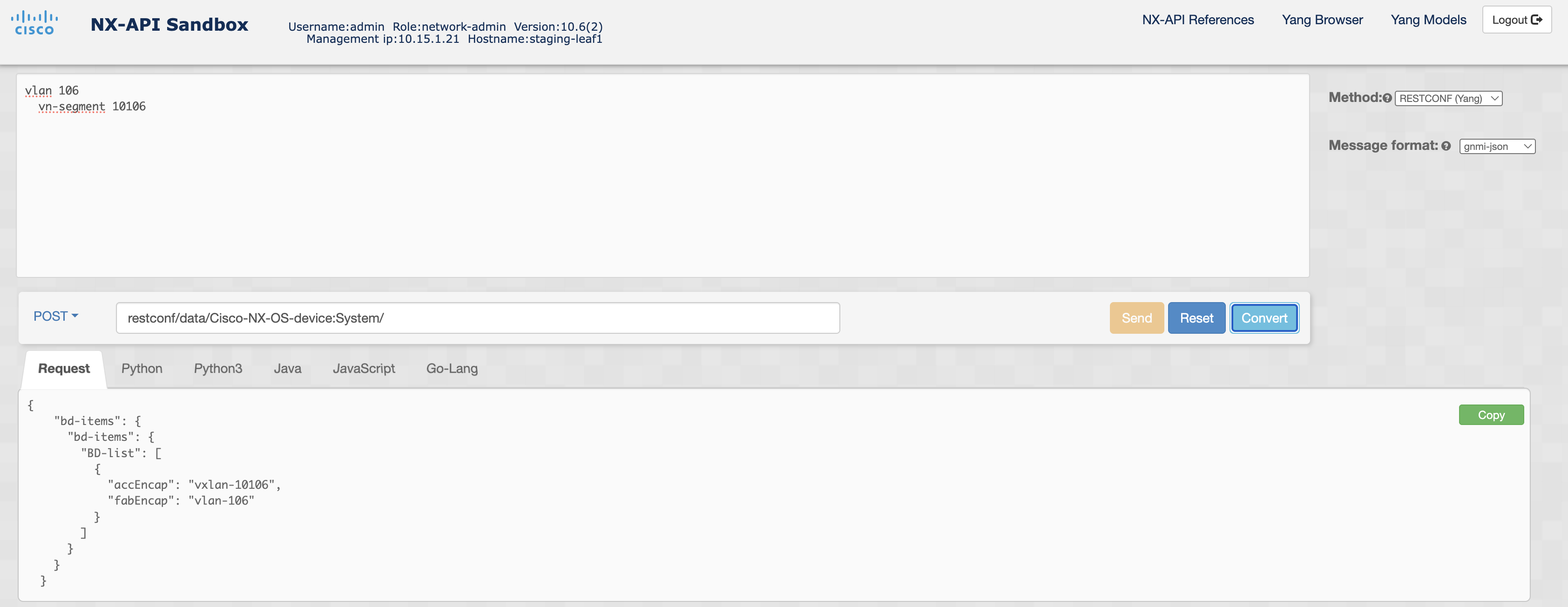
Return to your Terminal window and issue:
cd /home/pod06/workspace/nxapilab
bash -c "$(curl -sL https://get-gnmic.openconfig.net)"
gnmic version output:
version : 0.43.0
 commit : 883b7f9a
   date : 2026-02-01T21:03:39Z
 gitURL : https://github.com/openconfig/gnmic
   docs : https://gnmic.openconfig.net
Within your existing ansible-nxos directory, create a new role for the gNMI tasks. First, change to the 'roles' subdirectory and then create a new role.
cd /home/pod06/workspace/nxapilab/ansible-nxos/roles
ansible-galaxy init gnmi_vlans
Using the output from the Sandbox, create a JSON configuration template file.
Copy the data structure below into a JSON file.
touch /home/pod06/workspace/nxapilab/ansible-nxos/roles/gnmi_vlans/files/gnmi_vlans.json
cat <<EOF >> /home/pod06/workspace/nxapilab/ansible-nxos/roles/gnmi_vlans/files/gnmi_vlans.json
{
    "bd-items": {
        "bd-items": {
            "BD-list": [
                {
                    "accEncap": "vxlan-10106",
                    "fabEncap": "vlan-106"
                }
            ]
        }
    }
}
EOF
touch /home/pod06/workspace/nxapilab/ansible-nxos/roles/gnmi_vlans/files/gnmi_nve.json
cat <<EOF >> /home/pod06/workspace/nxapilab/ansible-nxos/roles/gnmi_vlans/files/gnmi_nve.json
{
  "eps-items": {
    "epId-items": {
      "Ep-list": [
        {
          "epId": "1",
          "nws-items": {
            "vni-items": {
              "Nw-list": [
                {
                  "mcastGroup": "239.1.1.1",
                  "vni": "10106"
                }
              ]
            }
          }
        }
      ]
    }
  }
}
EOF
touch /home/pod06/workspace/nxapilab/ansible-nxos/roles/gnmi_vlans/files/gnmi_evpn.json
cat <<EOF >> /home/pod06/workspace/nxapilab/ansible-nxos/roles/gnmi_vlans/files/gnmi_evpn.json
{
    "evpn-items": {
        "adminSt": "enabled",
        "bdevi-items": {
            "BDEvi-list": [
                {
                    "encap": "vxlan-10106",
                    "rd": "rd:unknown:0:0",
                    "rttp-items": {
                        "RttP-list": [
                            {
                                "type": "export",
                                "ent-items": {
                                    "RttEntry-list": [
                                        {
                                            "rtt": "route-target:unknown:0:0"
                                        }
                                    ]
                                }
                            },
                            {
                                "type": "import",
                                "ent-items": {
                                    "RttEntry-list": [
                                        {
                                            "rtt": "route-target:unknown:0:0"
                                        }
                                    ]
                                }
                            }
                        ]
                    }
                }
            ]
        }
    }
}
EOF
touch /home/pod06/workspace/nxapilab/ansible-nxos/roles/gnmi_vlans/files/gnmi_vrf.json
cat <<EOF >> /home/pod06/workspace/nxapilab/ansible-nxos/roles/gnmi_vlans/files/gnmi_vrf.json
{
    "bgp-items": {
      "inst-items": {
        "asn": "65001",
        "dom-items": {
          "Dom-list": [
            {
              "name": "gNMIVRF",
              "rtrId": "10.0.0.101",
              "rtrIdAuto": "disabled",
              "af-items": {
                "DomAf-list": [
                  {
                    "advertL2vpnEvpn": "enabled",
                    "maxEcmp": "2",
                    "type": "ipv4-ucast"
                  }
                ]
              }
            }
          ]
        }
      }
    },
    "inst-items": {
      "Inst-list": [
        {
          "descr": "gNMI VRF",
          "encap": "vxlan-50001",
          "l3vni": "false",
          "name": "gNMIVRF",
          "dom-items": {
            "Dom-list": [
              {
                "name": "gNMIVRF",
                "rd": "rd:unknown:0:0",
                "af-items": {
                  "DomAf-list": [
                    {
                      "type": "ipv4-ucast",
                      "ctrl-items": {
                        "AfCtrl-list": [
                          {
                            "type": "l2vpn-evpn",
                            "rttp-items": {
                              "RttP-list": [
                                {
                                  "type": "export",
                                  "ent-items": {
                                    "RttEntry-list": [
                                      {
                                        "rtt": "route-target:unknown:0:0"
                                      }
                                    ]
                                  }
                                },
                                {
                                  "type": "import",
                                  "ent-items": {
                                    "RttEntry-list": [
                                      {
                                        "rtt": "route-target:unknown:0:0"
                                      }
                                    ]
                                  }
                                }
                              ]
                            }
                          },
                          {
                            "type": "ipv4-ucast",
                            "rttp-items": {
                              "RttP-list": [
                                {
                                  "type": "export",
                                  "ent-items": {
                                    "RttEntry-list": [
                                      {
                                        "rtt": "route-target:unknown:0:0"
                                      }
                                    ]
                                  }
                                },
                                {
                                  "type": "import",
                                  "ent-items": {
                                    "RttEntry-list": [
                                      {
                                        "rtt": "route-target:unknown:0:0"
                                      }
                                    ]
                                  }
                                }
                              ]
                            }
                          }
                        ]
                      }
                    }
                  ]
                }
              }
            ]
          }
        }
      ]
    }
  }
EOF
touch /home/pod06/workspace/nxapilab/ansible-nxos/roles/gnmi_vlans/files/gnmi_anycast_gw.json
cat <<EOF >> /home/pod06/workspace/nxapilab/ansible-nxos/roles/gnmi_vlans/files/gnmi_anycast_gw.json
{
    "ipv4-items": {
      "inst-items": {
        "dom-items": {
          "Dom-list": [
            {
              "name": "gNMIVRF",
              "if-items": {
                "If-list": [
                  {
                    "id": "vlan106",
                    "addr-items": {
                      "Addr-list": [
                        {
                          "addr": "192.168.106.1/24",
                          "pref": "0",
                          "tag": "12345",
                          "type": "primary"
                        }
                      ]
                    }
                  },
                  {
                    "forward": "enabled",
                    "id": "vlan501"
                  }
                ]
              }
            }
          ]
        }
      }
    },
    "icmpv4-items": {
      "inst-items": {
        "dom-items": {
          "Dom-list": [
            {
              "name": "gNMIVRF",
              "if-items": {
                "If-list": [
                  {
                    "ctrl": "port-unreachable",
                    "id": "vlan106"
                  },
                  {
                    "ctrl": "port-unreachable",
                    "id": "vlan501"
                  }
                ]
              }
            }
          ]
        }
      }
    },
    "hmm-items": {
      "fwdinst-items": {
        "if-items": {
          "FwdIf-list": [
            {
              "id": "vlan106",
              "mode": "anycastGW"
            }
          ]
        }
      }
    },
    "intf-items": {
      "svi-items": {
        "If-list": [
          {
            "adminSt": "up",
            "descr": "Configured by gNMIc",
            "id": "vlan106",
            "rtvrfMbr-items": {
              "tDn": "/System/inst-items/Inst-list[name='gNMIVRF']"
            }
          },
          {
            "adminSt": "up",
            "descr": "Configured by gNMIc",
            "id": "vlan501",
            "rtvrfMbr-items": {
              "tDn": "/System/inst-items/Inst-list[name='gNMIVRF']"
            }
          }
        ]
      }
    }
  }
EOF
Create the Ansible tasks using the ansible.builtin.shell module to invoke gNMIc commands. Each task will use gNMIc to send the JSON
configuration templates created in the steps above and apply them to the running config. The final task will retrieve and display the NVE VNI
mappings to verify that the configuration was applied correctly.
Copy the playbook YAML file.
cat <<EOF >> /home/pod06/workspace/nxapilab/ansible-nxos/roles/nc_vlan_vni/tasks/main.yml

- name: Merge VLAN Config
  ansible.builtin.shell: |
    gnmic -a {{ ansible_host }}:50051 -u {{ ansible_user }} -p {{ ansible_password }} --skip-verify set --update-path /System/ --update-file {{ role_path ~ '/files/gnmi_vlans.json' }}
  delegate_to: localhost

- name: Merge NVE Config
  ansible.builtin.shell: |
    gnmic -a {{ ansible_host }}:50051 -u {{ ansible_user }} -p {{ ansible_password }} --skip-verify set --update-path /System/ --update-file {{ role_path ~ '/files/gnmi_nve.json' }}
  delegate_to: localhost

- name: Merge EVPN Config
  ansible.builtin.shell: |
    gnmic -a {{ ansible_host }}:50051 -u {{ ansible_user }} -p {{ ansible_password }} --skip-verify set --update-path /System/ --update-file {{ role_path ~ '/files/gnmi_evpn.json' }}
  delegate_to: localhost

- name: Merge VRF Config
  ansible.builtin.shell: |
    gnmic -a {{ ansible_host }}:50051 -u {{ ansible_user }} -p {{ ansible_password }} --skip-verify set --update-path /System/ --update-file {{ role_path ~ '/files/gnmi_vrf.json' }}
  delegate_to: localhost

- name: Merge Anycast GW Config
  ansible.builtin.shell: |
    gnmic -a {{ ansible_host }}:50051 -u {{ ansible_user }} -p {{ ansible_password }} --skip-verify set --update-path /System/ --update-file {{ role_path ~ '/files/gnmi_anycast_gw.json' }}
  delegate_to: localhost

- name: Get NVE VNIs
  ansible.builtin.shell: |
    gnmic -a {{ ansible_host }}:50051 -u {{ ansible_user }} -p {{ ansible_password }} --skip-verify get --path "/System/eps-items/epId-items" --format "json"
  delegate_to: localhost
  register: vni_check

- name: Debug Output
  ansible.builtin.debug:
    var: vni_check.stdout | ansible.builtin.from_json

EOF
Create a new hosts file with a group heading called gnmi-inventory that includes your leaf switches' IP addresses.
Copy the gnmi-inventory file.
cat <<EOF >> /home/pod06/workspace/nxapilab/ansible-nxos/gnmi-inventory
---
# hosts file for gNMIc Ansible playbook

nxos:
  vars:
    ansible_connection: ansible.netcommon.grpc
    ansible_user: admin
    ansible_password: cisco.123
    ansible_port: 50051
    # ansible_grpc_connection_type: cisco.nxos.nxos
    # ansible_network_os: cisco.nxos.nxos
  children:
    leafs:
      hosts:
        staging-leaf1:
            ansible_host: 10.15.6.21
        staging-leaf2:
            ansible_host: 10.15.6.22

EOF
Create a new main playbook that associates the leaf host grouping and the gnmi_vlans role.
Copy the main playbook YAML file.
cat <<EOF >> /home/pod06/workspace/nxapilab/ansible-nxos/gnmi.yml

---
# main playbook

- hosts: leafs
  gather_facts: false

  roles:
    - role: gnmi_vlans

EOF
Execute the Ansible playbook:
cd /home/pod06/workspace/nxapilab/ansible-nxos
ansible-playbook -i gnmi-inventory gnmi.yml
Alternatively, you can add -vvv for verbose debugging output for each task that is executed.